

The POS has been made as easy and quick to use as possible.
You can get more information about the functions in the image below by hovering your mouse over the green plus symbol. 
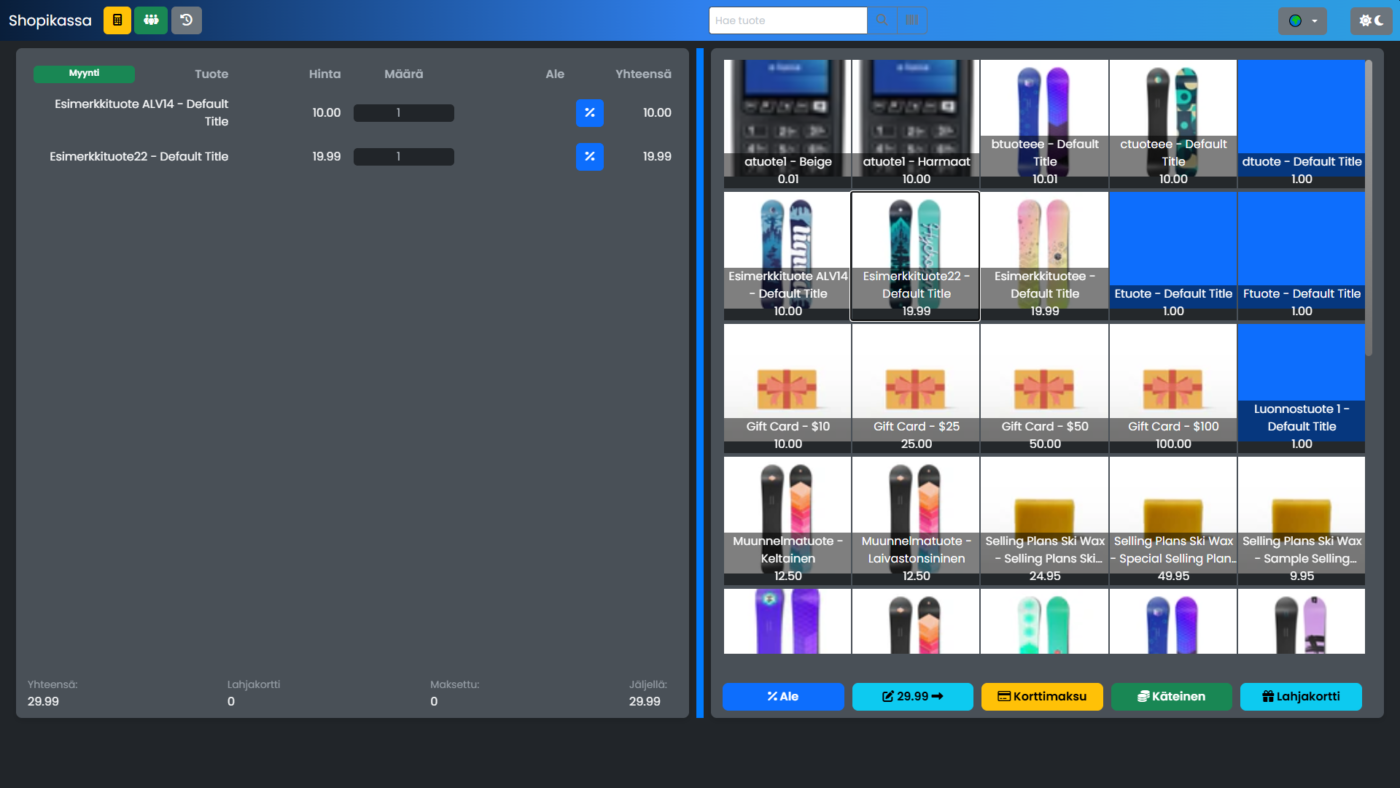
Instructions
Paying with a card payment terminal
If you are paying the remaining balance, just click Card payment. If you are charging a different amount, first enter the amount to be charged.
Integrated payment terminal: The amount will automatically go to the payment terminal, and a successful payment will be automatically recorded.
Standalone payment terminal: First, make a card payment at the payment terminal and enter it in your Shopikassa when the payment is successful.
Paying in cash and having change
If a payment is made other than a remaining sum, enter the amount received using the Amount button, then select Cash.
If the amount received was greater than the remaining amount, the cashier will calculate the change.
Paying with multiple payment methods
First enter the amount to be charged using the Amount button and then select your preferred payment method.
Refund, return, repair and cancellation
All changes to closed transactions, such as refunds, returns, or corrections, are made by first refunding the transaction in History -> Refund. Then enter the correct transaction.
Gift card
Shopikassa uses Shopify online store gift cards.
If you want to sell new gift cards, make sure that gift card type products have been created in Shopify.
You pay with a gift card like you would with other payment methods. Click the Gift Card button, search for and select the gift card you want.